CrowPanel ESP32 HMI 5.0-inch Display
Description
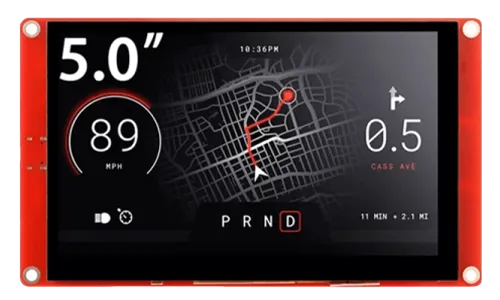
Elecrow ESP32 5.0-inch display is a powerful HMI touch screen with a 800*480 resolution LCD display. It uses the ESP32-S3-WROOM-1-N4R2 module as the main control processor, with a dual-core 32-bit LX6 microprocessor, integrated WiFi and Bluetooth wireless functions, a main frequency of up to 240MHz,providing powerful performance and versatile applications, suitable for IoT application devices and other scenes.
The module includes a 5.0-inch LCD display and a driver board. The display screen uses a resistive touch technology and comes with a resistive touch pen, making the screen usage more flexible. In addition, the board has reserved a TF card slot, multiple peripheral interfaces, USB interface, speaker interface, battery interface, etc., providing more expansion possibilities. It supports development environments such as Arduino IDE, Espressif IDF, Lua RTOS, Micro Python, and is compatible with the LVGL graphics library. This enables developers to not only customize their own UI interfaces but also to create interesting projects quickly and easily, greatly shortening the development cycle.
The ESP32 5.0-inch display is suitable for a wide range of scenes such as automotive HMI, medical equipment, industrial control, power, civil electronics, automation, GPS, new energy, and IoT application devices. Its various interfaces and expansion functions make it able to meet the needs of different fields, providing users with a more comprehensive solution.
Module: DIS07050H

Updated Record
Please click on the "UPDATED RECORD" below to check the updated details in text.

Please watch below to check the updated explanation.
Feature
- Integrated ESP32-S3-WROOM-1-N4R8 module,built-in wireless communication 2.4 GHz Wi-Fi (802.11 b/g/n) and Bluetooth 5.0;
- Support development environment Arduino IDE, Espressif IDF, Lua RTOS, Micro python and compatible with LVGL graphics library;
- Built-in LVGL demo interface and Arduino example, plug and play;
- LCD 800*480 5.0 inches TFT-LCD with driver IC ILI6122/ILI5960;
- Rich peripheral interfaces and expansion functions enable it to meet the needs of different fields.
Specification
- Model: 5.0 inch CrowPanel ESP32 display
- Main Processor: ESP32-S3-WROOM-1-N4R8
- Resolution: 800*480
- Color Depth: 16M
- Touch Type: Resistive Touch Screen
- Touch Panel: TN Panel
- Screen: TFT-LCD Screen
- Display driver: ILI6122/ILI5960
- External power supply: DC5V-2A
-
Interface: 1xTF Card Slot, 2x GPIO, 1xSpeak, 1xUART0, 2xI2C,1xBAT
-
Battery voltage: 3.7-4.2V
- Button: BOOT Button and Reset Button
Pin Out
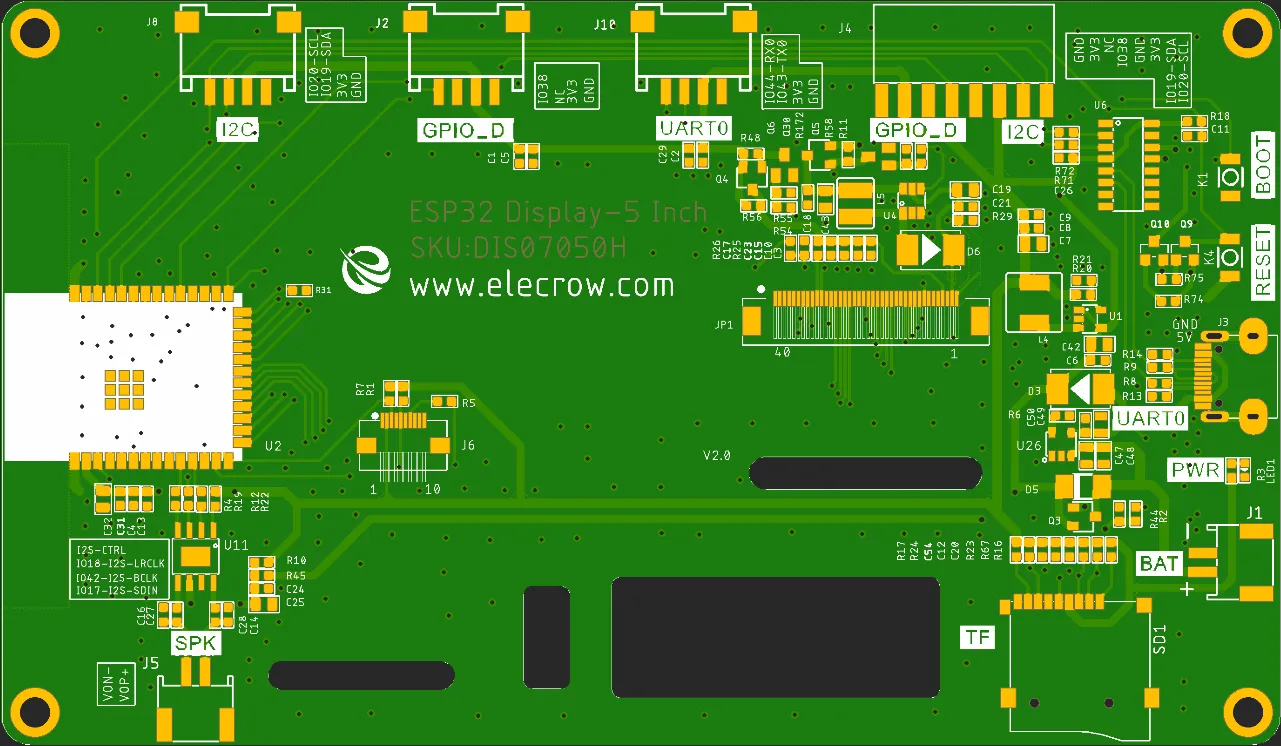
| Pin Name | Description | Connector Type |
|---|---|---|
| SPK | Output audio signal,connected with speakers. The motherboard comes with a power amplifier chip circuit. | PH2.0-2P |
| PWR | Power LED. | |
| RST | Reset button. Push it to reset the system. | |
| BOOT | ||
| GPIO_D | Digital and artificial I/O interface. | HY2.0-4P |
| I2C | Build the communication among micro controller and peripheral devices. | HY2.0-4P |
| TF | Provide off-line save and extra storage space. | |
| BAT | Connect with the lithium battery. (With the battery charging circuit)(Input voltage: 3.7–4.2 V) | PH2.0-2P |
| UART0 | Provide serial communication, supply voltage(transform USB to UART0) and serial information printing. | HY2.0-4P/USB-C |
| 5.0-inch HMI Port | Pin Number |
|---|---|
| GPIO_D | IO38 |
| UART | RX(IO44); TX(IO43) |
| I2C | SDA(IO19); SCL(IO20) |
| SPK(I2S) | I2S-CTRL; I2S-LRCLK(IO18); I2S-BCLK(IO42); I2S-SDIN(IO17) |
| SD Card Slot(SPI) | MOSI(IO11); MISO(IO13); CLK(IO12); CS(IO10) |
| LCD Backlight | IO2 |
Schematic Diagram
ESP32-S3 and TFT display wiring pins
Schematic Diagram:
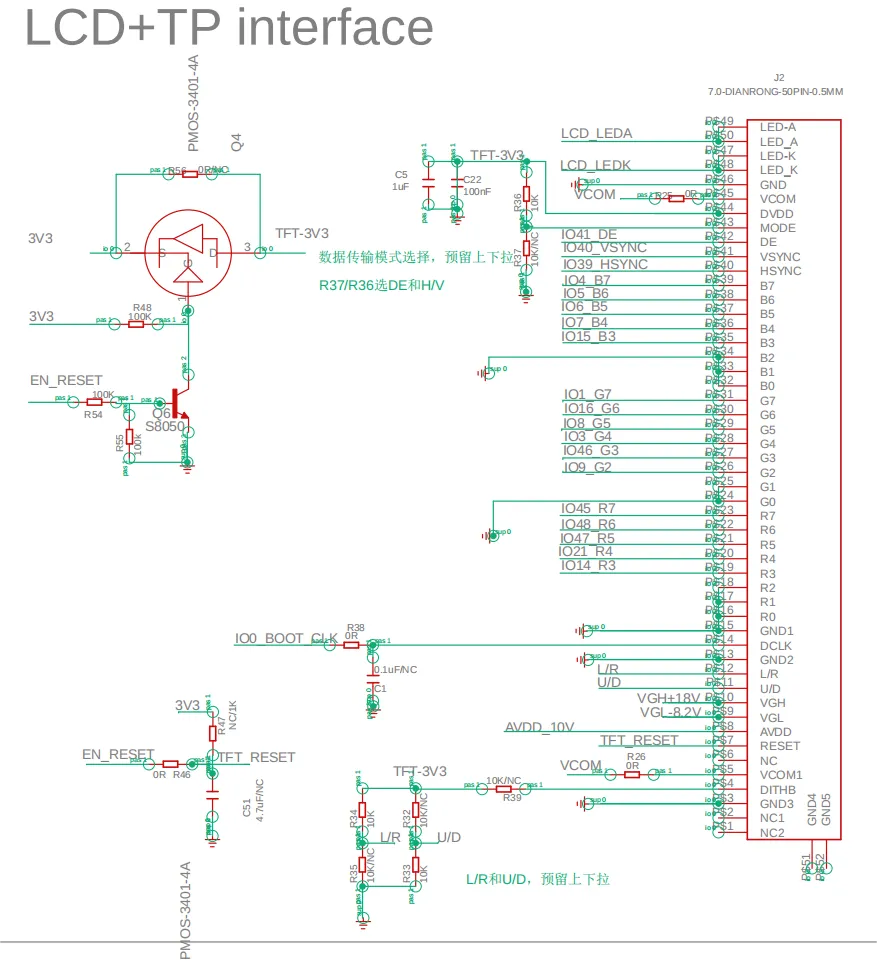
Definition in the main program:
class LGFX : public lgfx::LGFX_Device
{
public:

  lgfx::Bus_RGB     _bus_instance;
  lgfx::Panel_RGB   _panel_instance;

  LGFX(void)
  {


    {
      auto cfg = _bus_instance.config();
      cfg.panel = &_panel_instance;

      cfg.pin_d0  = GPIO_NUM_8; // B0
      cfg.pin_d1  = GPIO_NUM_3;  // B1
      cfg.pin_d2  = GPIO_NUM_46;  // B2
      cfg.pin_d3  = GPIO_NUM_9;  // B3
      cfg.pin_d4  = GPIO_NUM_1;  // B4

      cfg.pin_d5  = GPIO_NUM_5;  // G0
      cfg.pin_d6  = GPIO_NUM_6; // G1
      cfg.pin_d7  = GPIO_NUM_7;  // G2
      cfg.pin_d8  = GPIO_NUM_15;  // G3
      cfg.pin_d9  = GPIO_NUM_16; // G4
      cfg.pin_d10 = GPIO_NUM_4;  // G5

      cfg.pin_d11 = GPIO_NUM_45; // R0
      cfg.pin_d12 = GPIO_NUM_48; // R1
      cfg.pin_d13 = GPIO_NUM_47; // R2
      cfg.pin_d14 = GPIO_NUM_21; // R3
      cfg.pin_d15 = GPIO_NUM_14; // R4

      cfg.pin_henable = GPIO_NUM_40;
      cfg.pin_vsync   = GPIO_NUM_41;
      cfg.pin_hsync   = GPIO_NUM_39;
      cfg.pin_pclk    = GPIO_NUM_0;
      cfg.freq_write  = 15000000;

      cfg.hsync_polarity    = 0;
      cfg.hsync_front_porch = 8;
      cfg.hsync_pulse_width = 4;
      cfg.hsync_back_porch  = 43;

      cfg.vsync_polarity    = 0;
      cfg.vsync_front_porch = 8;
      cfg.vsync_pulse_width = 4;
      cfg.vsync_back_porch  = 12;

      cfg.pclk_active_neg   = 1;
      cfg.de_idle_high      = 0;
      cfg.pclk_idle_high    = 0;

      _bus_instance.config(cfg);
    }
            {
      auto cfg = _panel_instance.config();
      cfg.memory_width  = 800;
      cfg.memory_height = 480;
      cfg.panel_width  = 800;
      cfg.panel_height = 480;
      cfg.offset_x = 0;
      cfg.offset_y = 0;
      _panel_instance.config(cfg);
    }
    _panel_instance.setBus(&_bus_instance);
    setPanel(&_panel_instance);

  }
};


LGFX lcd;
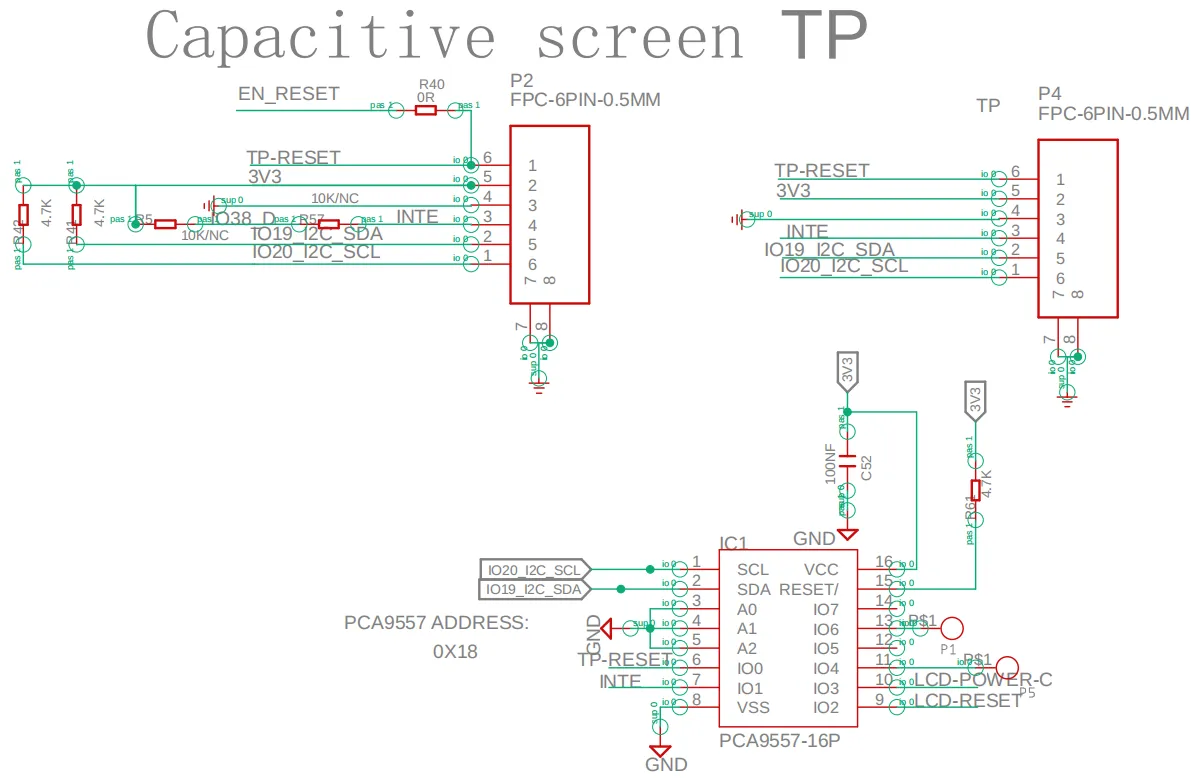
ESP32-S3 and touch driver wiring
Schematic Diagram:
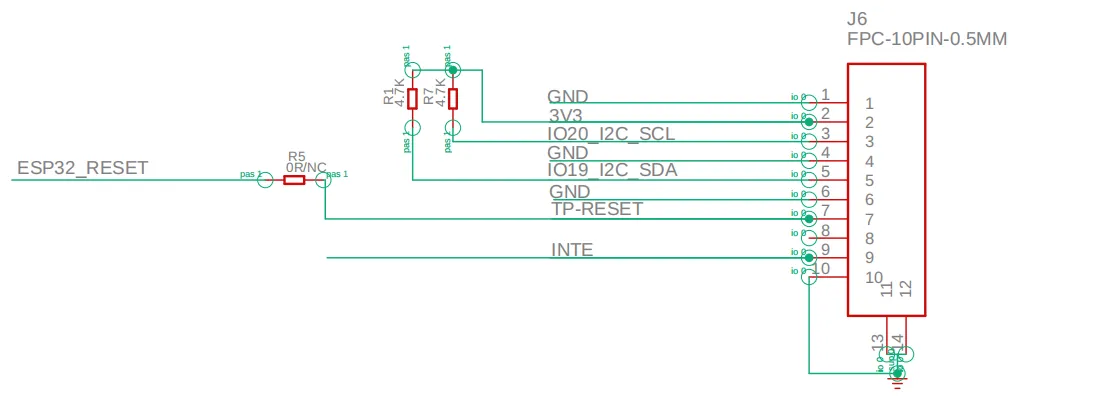
Pin definition in the touch.h:
Tips:
Please refer to this post to check how to connect sensor using I2C pin and also use touch with it.
Version 2.0 adds an automatic download feature over Version 1.0, eliminating the need to press boot+reset again before downloading the program.
Version 3.0 adds touch timing control based on Version 2.0 to prevent touch failures. When writing programs, you need to build upon the Version 2.0 program to implement the timing control logic.
PCA9557 Out;
Out.reset();
Out.setMode(IO_OUTPUT);
Out.setState(IO0, IO_LOW);
Out.setState(IO1, IO_LOW);
delay(20);
Out.setState(IO0, IO_HIGH);
delay(100);
Out.setMode(IO1, IO_INPUT);
Schematic Diagram:
Platforms Supported
| Arduino IDE | SquareLine Studio | PlatformIO | Home Assistant |
|---|---|---|---|
 |  |  |  |
 | | | |
| ESPHome | MicroPython | ESP-IDF |
|---|---|---|
 |  |  |
| | |
FAQ
- Click here to see the frequently asked questions of ESP32 display.
- Please list your question at the forum or contact techsupport@elecrow.com for technology support.
Resources
Github Link
- CrowPanel 5.0 HMI ESP32 Display 800x480
- (This GitHub link usually may contain 3D files, schematics, program code, factory firmware, factory sourcecode and other materials. Please click to view.)
Schematic & PCB
Specifications
Certification
- CrowPanel CE Certificate
- ESP32-S3-WROOM-1 Wi-Fi Certification
- ESP32-S3-WROOM-1 NCC Certification
- ESP32-S3-WROOM-1 IC Certification.pdf
- ESP32-S3-WROOM-1 MIC Certification.pdf