5inch IPS HD Display-C 1024*600 Touch Screen Compatible with Raspberry Pi/BB Black, etc
Description
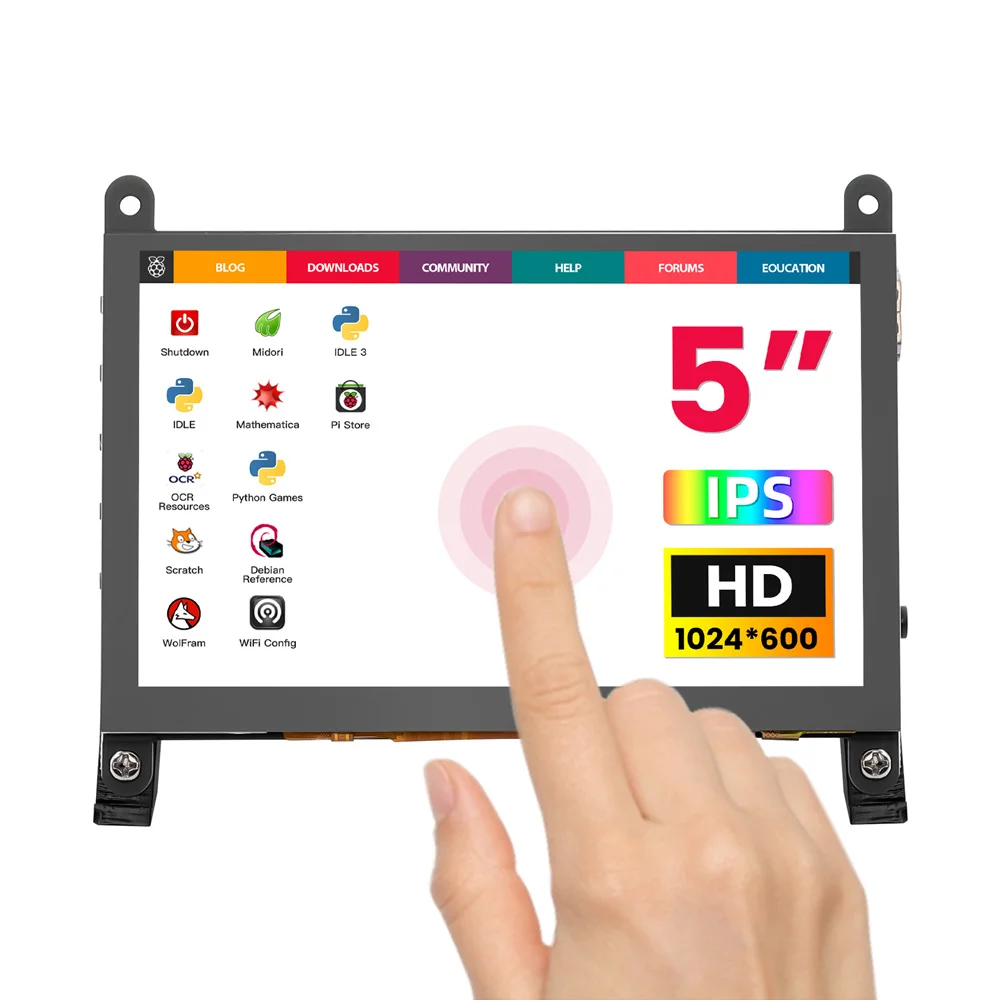
This 5-inch display features a high-quality IPS panel, offering a physical resolution of 1024×600 and supporting 1080P signal input via intelligent scaling for a crisp and realistic display. It integrates a 5-point capacitive touchscreen, enabling driverless touch control via USB, providing a smooth and responsive operating experience on Windows and various development platforms. It also supports USB dimming, FPC flexible cable expansion, and external headphone jacks, offering flexible signal connection solutions for various scenarios.
The 5-inch screen is equipped with a professional OSD menu, allowing easy adjustment of parameters such as brightness and contrast. Its excellent compatibility covers development boards such as Raspberry Pi and Banana Pi (supporting Raspbian/Ubuntu/Win10 IoT, multi-touch, driverless), perfectly adapts to Windows 7 to 11 systems (5-point touch, USB driverless), and is compatible with mainstream game consoles such as PS4 and Xbox. The product has passed CE and RoHS certifications, providing professional and reliable product assurance for development debugging, industrial control, and interactive entertainment.
OEM customization requests can be discussed for projects.
Model DLH04950B
Feature
- Superior Display: Utilizes a 5-inch IPS full-view panel with a physical resolution of 1024×600, supporting up to 1080P signal input for a crisp and lifelike picture.
- Precise Touch: Integrates a 5-point capacitive touchscreen with USB communication, offering plug-and-play functionality without drivers, ensuring smooth and responsive operation.
- Professional Functions: Features a headphone jack, a built-in OSD menu for adjusting brightness and contrast; supports USB dimming and FPC flexible cable expansion for easy integration.
- Wide Compatibility: Fully compatible with Raspberry Pi (supports Raspbian/Ubuntu), Windows ⅞/10/11 systems, and game consoles such as PS4 and Xbox.
- Reliable Certifications: The product is CE and RoHS certified, ensuring quality and environmental safety.
Specification
| Display size | 5.0inch |
|---|---|
| Display type | IPS |
| Field of view | 178° |
| Touch | Capacitive 5-point Touch |
| Resolution | 1024×600 |
| Backlight Brightness | 410cd/m2 |
| Refresh Rate | 60Hz |
| Power Voltage | 5V (USB Type-C) |
| Power Consumption | 0.30A×5V |
| Video Input Interface | HD/FPC Display Port |
| Touch Interface | USB |
| Headphone Jack | 3.5mm |
| Active Area | 108.00*64.80 mm |
| Dimensions | 121.11×95.24 mm |
| Net Weight | 112g |
Hardware Description
| Name | Description |
|---|---|
| HD Interface | Connects the motherboard for HDMI signal transmission |
| USB Touch/Power | Provides power and touch output (use either port) |
| Earphone Jack | 3.5mm audio output |
| Menu Button | Access OSD settings/selection |
| Left/Up | Navigation keys (backlight shortcut) |
| Right/Down | Navigation keys (backlight shortcut) |
| Return Button | Back to previous menu |
| Power Button | Turn the display on/off to save power |
20Pin-0.5mm-FPC HD Expansion Interface Description
| Number | Name | Description | Number | Name | Description |
|---|---|---|---|---|---|
| 1 | NC | No connection | 11 | RXC_P | Differential clock+ |
| 2 | RX0_N | Differential data 0- | 12 | GND | Ground |
| 3 | GND | Ground | 13 | RXC_N | Differential clock- |
| 4 | RX0_P | Differential data 0+ | 14 | NC | No connection |
| 5 | RX1_N | Differential data 1- | 15 | NC | No connection |
| 6 | GND | Ground | 16 | HDMI SCL | I2C clock |
| 7 | RX1_P | Differential data 1+ | 17 | HDMI SDA | I2C data |
| 8 | RX2_N | Differential data 2- | 18 | GND | Ground |
| 9 | GND | Ground | 19 | HDMI 5V | 5V power supply |
| 10 | RX2_P | Differential data 2+ | 20 | HDMI HPD0 | Hotplug detection |
4Pin-1.25mm Touch Expansion Interface Definition
| Pin | Label | Function |
|---|---|---|
| 1 | 5V | Power supply |
| 2 | D+ | USB data+ |
| 3 | D- | USB data- |
| 4 | GND | Ground |
Usage Instructions
Windows System - USB Dimming Software Guide
Step1. Download and Extract USB Dimming Software (Windows)
LCD-USB-BRIGHTNESS-Windows-V1.0
Step2. Run LCD-USB-BRIGHTNESS-Windows-V1.0.exe
-
Displays "Screen Disconnected" when not connected
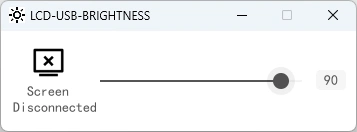
Step3. Connect Display USB to PC
-
Shows "Screen Connected" with real-time brightness adjustment • Saves last brightness setting.
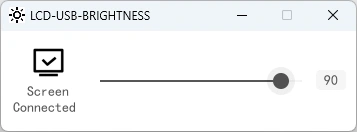
Raspberry Pi (Raspbian/Ubuntu Mate/Win10 IoT Core) Setup
Step1. Install Official Image
- Download latest official image
- Follow official installation guide
Step2. Modify config.txt
Add following lines to end of config.txt:
hdmi_force_edid_audio=1
max_usb_current=1
hdmi_force_hotplug=1
config_hdmi_boost=7
hdmi_group=2
hdmi_mode=87
hdmi_drive=2
hdmi_cvt 1024 600 60 6 0 0 0
Note: For 2021-10-30 Raspbian, comment out: #dtoverlay=vc4-kms-v3d
Step3. Connect and Power On
-
Insert SD card into Pi
-
Connect HDMI and USB
-
Use ≥2A power supply
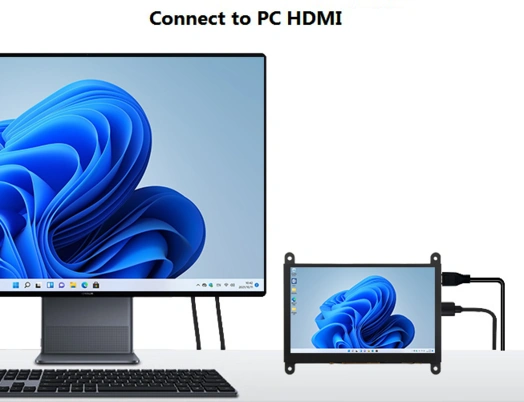
Using as PC Monitor
-
Connect PC HDMI to display HDMI
-
Connect USB touch to PC USB port
-
Test as single display first
How to rotate the display direction
This method only applies to the Raspberry Pi series of display screens, other display screens do not apply.
-
Method 1,If the driver is not installed, execute the following command (Raspberry Pi needs to connected to the Internet):
sudo rm -rf LCD-show
git clone https://github.com/goodtft/LCD-show.git
chmod -R 755 LCD-show
cd LCD-show/
sudo ./XXX-show 90
After execution, the driver will be installed. The system will automatically restart, and the display screen will rotate 90 degrees to display and touch normally.
( ' XXX-show ' can be changed to the corresponding driver, and ' 90 ' can be changed to 0, 90, 180 and 270, respectively representing rotation angles of 0 degrees, 90 degrees, 180 degrees, 270 degrees) -
Method 2,If the driver is already installed, execute the following command:
After execution, the system will automatically restart, and the display screen will rotate 90 degrees to display and touch normally.
( ' 90 ' can be changed to 0, 90, 180 and 270, respectively representing rotation angles of 0 degrees, 90 degrees, 180 degrees, 270 degrees)
If the rotate.sh prompt cannot be found, use Method 1 to install the latest drivers.
Resources
How to buy
Please visit this page to purchase 5inch IPS HD Display-C.
Support
If you have any problem about how to use it, you can connect to us at the bottom-right of bazzer or contact to techsupport@elecrow.com to get technology support.