Mini PC Case With 1.3” OLED Screen For Raspberry Pi 5/Jetson Orin Nano
Model SEJ00007D


Pin Description:
| Module Signal Name | Net | Equipment |
|---|---|---|
| 1 | D2/I2C1_SDA D3/I2C1_SCL | IIC BUS: 3.3V BUS Barometer(ADD:0x77) Accelerometer&Gyro(ADD:0x68) Temperature & Humidity(ADD:0x38) LIGHT Sensor(ADD:0x5C) 5V BUS LCD (ADD:0x27) Digital display (ADD:0x70) I/O Expander (TCA9534APWR IO Expansion chip)(ADD:0x3C) STCG1K08A(Microcontroller) RP2040(Microcontroller) J21 and J22 (Reserved for user IIC interface) |
| 2 | D4 | Tilt sensor |
| 3 | D14/UART1_TXD | J23 (Reserve for user access via UART interface) |
| 4 | D15/UART1_RXD | J23 (Reserve for user access via UART interface) |
| 5 | D17/UART1_RTS | Touch Sensor |
| 6 | D27/SPI1_SCK | Vibration sensor |
| 7 | D23/SPI1_CS1 | PIR-Motion sensor |
| 8 | D25/SPI1_MISO | Photo Electric Counter |
| 9 | D10/SPI0_MOSI | SPI BUS: NFC Module(RC522 ) |
| 10 | D9/SPI0_MISO | SPI BUS: NFC Module(RC522 ) |
| 11 | D11/SPI0_SCK | SPI BUS: NFC Module(RC522 ) |
| 12 | D8/SPI0_CS0 | RC522 (NFC Chip Chip Select) |
| 13 | D6 | HALL SENSOR |
| 14 | D16/UART1_CTS | Ultrasonic Sensor TRIG |
| 15 | D26/SPI1_MOSI | Ultrasonic Sensor CTS |
| 16 | D20/I2S0_SDIN | IR Remote Sensor |
| 17 | D18/I2S0_SCLK | LED(Red LED indicator) |
| 18 | D13/PWM | J5(Reserve I/O ports for user use) |
| 19 | D12/PWM | J6(Reserve I/O ports for user use) |
| Expansion Interface Chip | chip pin | NET | Equipment |
|---|---|---|---|
| STCG1K28A(Microcontroller) | Pin1:P1.0 | ADC_CH0 | Joystick X-axis |
| Pin2:P1.1 | ADC_CH1 | Joystick Y-axis | |
| Pin3:P1.2 | ADC_CH2 | Linear Potentiometer | |
| Pin4:P1.3 | ADC_CH3 | GAS-MQ2 | |
| Pin5:P1.4 | ADC_CH4 | Custom_key | |
| Pin6:P1.5 | ADC_CH5 | NTC (Thermistor) | |
| Pin30:P0.1 | RELAY | Relay | |
| Pin31:P0.2 | BUZZER | Buzzer Control | |
| Pin13:RXD | STC8_RXD | Program Download | |
| Pin14:TXD | STC8_TXD | Program Download | |
| Pin7:SCL | D3/I2C1_SCL | IIC BUS | |
| Pin8:SDA | D2/I2C1_SDA | ||
| TCA9534APWR IO Expansion chip | Pin4:P0 | STEP1 | Stepper Motor Driver |
| Pin5:P1 | STEP2 | ||
| Pin6:P2 | STEP3 | ||
| Pin7:P3 | STEP4 | ||
| Pin12:P7 | ENCODER_B | Encode | |
| Pin11:P6 | ENCODER_A | ||
| Pin11:P5 | ENCODER_SW | ||
| RP2040 | Pin47 | USB_D+ | USB download port |
| Pin46 | USB_D- | ||
| Pin39:P27 | RP2040_IO27_RGB_POWER_EN | 8*8 RGB Power Control | |
| Pin8:P6 | RP2040_IO6_RGB | 8*8 RGB Signal | |
| Pin16:P13 | RP2040_IO13_SERVO_1 | Gimbal Servo Interface | |
| Pin17:P14 | RP2040_IO13_SERVO_2 | Gimbal Servo Interface | |
| Pin21:P32 | D2/I2C1_SDA | IIC BUS | |
| Pin20:P31 | D3/I2C1_SCL |
Jetson Nano Module Interface Pin Description
| Feature | Module Signal Name | Pin | Pin | Module Signal Name | Feature | |
|---|---|---|---|---|---|---|
| VCC3V3 | 1 | 2 | VCC5V | |||
| D2/I2C1_SDA | 3 | 4 | VCC5V | |||
| D3/I2C1_SCL | 5 | 6 | GND | |||
| D4 | 7 | 8 | D14/UART1_TXD | |||
| GND | 9 | 10 | D15/UART1_RXD | |||
| D17/UART1_RTS | 11 | 12 | D18/I2S0_SCLK | |||
| D27/SPI1_SCK | 13 | 14 | GND | |||
| D22/LCD_TE* | 15 | 16 | D23/SPI1_CS1 | |||
| VCC3V3 | 17 | 18 | D24/SPI1_CS0 | |||
| D10/SPI0_MOSI | 19 | 20 | GND | |||
| D9/SPI0_MISO | 21 | 22 | D25/SPI1_MISO | |||
| D11/SPI0_SCK | 23 | 24 | D8/SPI0_CS0 | |||
| GND | 25 | 26 | D7/SPI0_CS1 | |||
| D0/ID_I2C_SDA | 27 | 28 | D1/ID_I2C_SCL | |||
| D5/CAM_AF_EN* | 29 | 30 | GND | |||
| D6 | 31 | 32 | D12/PWM | |||
| D13/PWM | 33 | 34 | GND | |||
| D19/I2S0_LRCK | 35 | 36 | D16/UART1_CTS | |||
| D26/SPI1_MOSI | 37 | 38 | D20/I2S0_SDIN | |||
| GND | 39 | 40 | D21/I2S0_SDOUT |
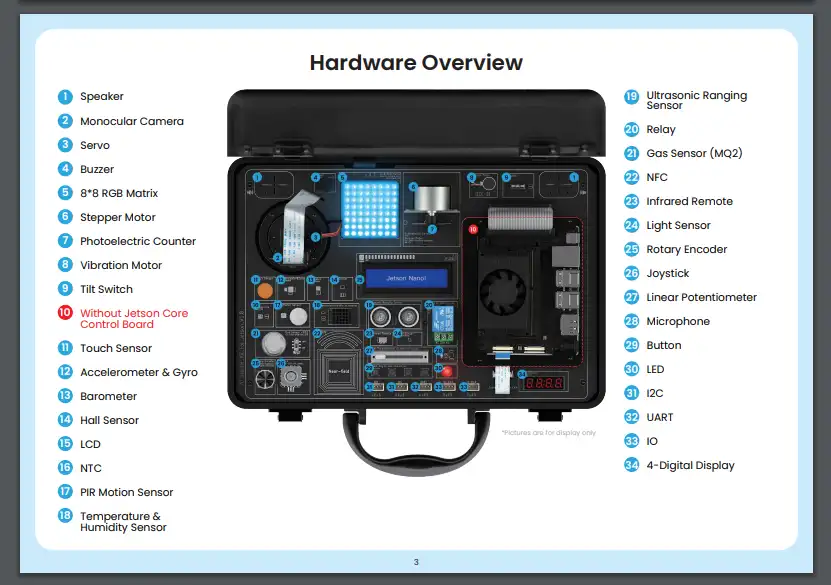
Hardware Overview
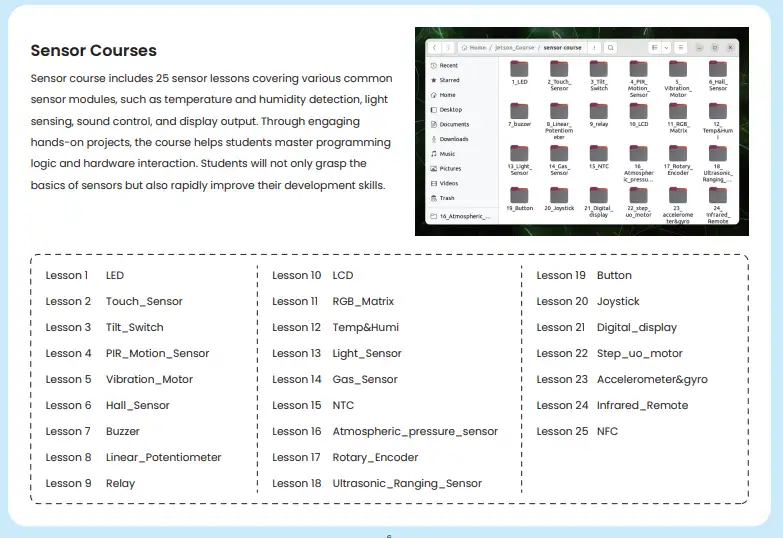
Sensor Courses
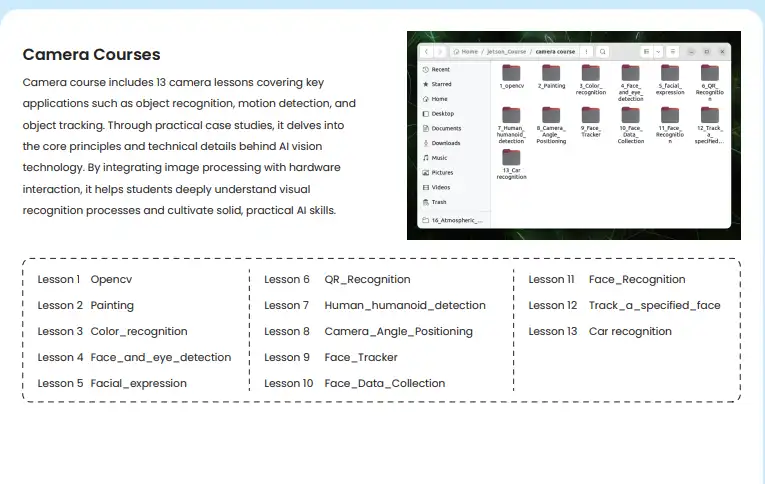
Camera Courses
User guide:
Solid-State Flashing and Boot Methodology and SD Card Flashing Guide:
Github:
AI-Starter-Kit-for-Jetson-Orin-Nano-with-Common-Board-design
Guide Video:
Unboxing & Setting Up the AI Starter Kit for Jetson Orin Nano | Beginner's Guide
Master Camera & AI Vision: Hands-On Starter Kit Course for Jetson Orin Nano
Openclaw Column
Jetson OpenClaw Install & Config Guide
How to buy
Please visit this page to purchase AI Starter Kit for Jetson Orin Nano.
Support
If you have any problem about how to use it, you can connect to us at the bottom-right of bazzer or contact to techsupport@elecrow.com to get technology support.